Newest at the top, written for a person. What changed, what broke and what is still
missing.
The "what's new" text in the Play Store comes from the same files as this page, so the
two cannot drift apart.
Want to hear when a version goes out? There is an Atom feed with
every release, carrying the same short text per release as the Play Store. No newsletter
and no address to leave behind: your feed reader fetches a file, and nobody here knows
you did.
1.1.0
Everyone · copy a card number, ordering in the top bar, and South Africa
This version finishes three things that were half done in 1.0.0. You could see a card
number but not take it with you, ordering lived only in the settings, and the tiles drew
stripes that looked like a barcode with nothing in them.
Copying works two ways now: the Copy card number button, or holding the code itself. On
Android 13 and newer Stapel tells the clipboard the text is sensitive, so the keyboard's
paste preview does not show the number. On older versions of Android that flag does not
exist, so I cannot promise it there.
Ordering is in the top bar of the wallet now as well. The strip along the bottom of a tile
shows which kind of code the card has: one row for a linear code, two rows for a stacked
one, dots for a square one. It is ornament with nothing in it, so do not hold a tile under
a scanner.
Shops in South Africa are in as well, and the arrival takeover is now really off when you
switch it off.
1.0.1
Everyone · the About screen link points at stapel-app.nl
Stapel now lives at stapel-app.nl. Until this version the link to the release page, at the
bottom of the About screen, still pointed at the address the site had before it had a
domain of its own. That link now points at the new address.
Nothing else changed. The old address keeps working, so nothing is broken on 1.0.0.
1.0.0 Play Store
For everyone · Stapel is in the Play Store
Stapel is in the Play Store. No tester list any more, no mail to me: you look it up and
install it.
Nothing in the app has changed. This is the same version as the last closed test, with the
same version number in everything but the name. What changes is who can install it: until
now I had to add your email address to a tester list, and that is no longer needed.
I deliberately added nothing for this version. A 1.0 that carries new things is a 1.0
nobody has tested. This is the build that came through a test round, and that is exactly
the build going out.
No ads, no tracking, no account. Your cards live on your own phone and nowhere else.
Stapel is free and stays free.
0.9.13 Closed test
Testers only · Arrival detection knows which cards you hold again
This release adds nothing. It is fifteen repairs, and they all have the same shape: the app
quietly did something other than what you expected, and said nothing about it. That is the
most annoying kind of fault, because there is nothing to respond to.
With arrival detection on, the shops around you are set from the chains of your cards, but
only the screen where you edit a card asked for a fresh round. Scanning a card in, linking
one from a shop, deleting one or importing them did not. So: an Albert Heijn card added,
an AH walked into that afternoon, and nothing happened. For a deleted card the shops stayed
set instead. That is now all five. Turning your location off and on again also asks for a
fresh round, as long as Stapel is still running at that moment: if it is off overnight,
that happens when you next open the app.
The card that appears on your lock screen stayed there after you no longer needed it. Lock
the card, delete it, or turn the setting off, and it now goes away. And rotating your phone
loses nothing: the code you were scanning, the unlock for an export, an import still
running and a shop database still updating all survive the turn.
Beyond that, two quick taps on Save stored the card twice, and if you brought your cards
over from another wallet app, a gift voucher Stapel could match to a brand it knows was
stored as a loyalty card. A voucher sits behind your screen lock by default and a loyalty
card does not, so that voucher lay open. It now stays shut.
0.9.12 Closed test
Testers only · The card for the shop you are in moves to the top
This release is almost entirely looks, readability and feel. I went through the app three
times over for design and usability, and everything that came out of that is in here. No
feature is added: what was already there now sits where you look for it, can be read if
your eyesight is poor, and moves instead of jumping.
If you are in a shop Stapel knows and you hold a card for it, that card used to sit
somewhere in Everything, in alphabetical order. With thirty cards that means searching
while the queue waits behind you. It now moves to the top, under the heading Here. It
moves there, it is not copied: in the first attempt the same card appeared twice on one
screen.
In 0.9.11 the question of whether you were standing in this shop sat under the barcode.
That was exactly the wrong place. You hold your phone up at the till, and one thumb
movement away from Landscape linked the card to a chain, with no confirmation and no way
back. That question has left the till, and a card linked to the wrong shop can now be
unlinked.
The largest part of this release is the least visible if you do not need it. The screen
lock explanation was grey on grey, which is the one sentence that tells you why your card
cannot be protected. The colour of the text on a tile is now worked out per brand, so it
reads on every brand colour. TalkBack says whether a card is a favourite, and reads the
barcode once instead of twice. At font size 2.0 the digits of the code broke across two
lines and the add button covered a card. That is sorted.
And on a tablet, an unfolded foldable or a phone held sideways, Stapel did not use the
width: one column in the middle, the rest empty. The card now sits beside your wallet.
0.9.11 Closed test
Testers only · A card with no shop no longer vanishes
Both changes come from one report. A tester stood in a shop with that shop's card in the
app, and the Shops screen listed only the two neighbours. The card was there, the shop was
there, and nothing connected them. The bad part was not that it went wrong, but that
nothing said it had.
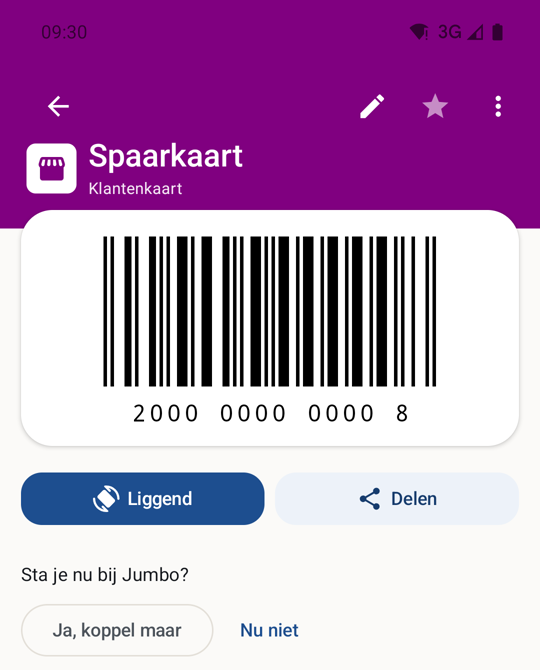
Open a card with no chain linked, while your phone can place you inside a shop Stapel
knows, and one line now sits under the barcode: are you in this shop right now? One tap
links it, and only the chain is written. Say "Not now" and that question stays away for
thirty days for that card. The line sits below the code rather than above it, because a
card you open in a shop is usually about to be scanned.
12
1The code keeps the top of the screen. The question sits underneath, so nothing covers what the till has to scan.
2Stapel can tell which shop you are standing in and asks once. One tap links it, and only the chain is written. Say "Nu niet" (not now) and this shop stays quiet for this card for thirty days.
A card belonging to no chain, opened inside a shop. Captured on 0.9.11. The location was injected, not walked.
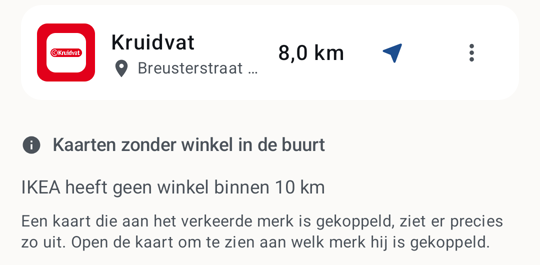
And a card whose chain has no shop at all within the search range used to drop out of both
halves of the Shops screen. It now says there is no shop within the range that was
searched, and what to look at when that happens: a card linked to the wrong brand looks
exactly like this.
12
1The shops you can actually get to, sorted by distance.
2Underneath sits what used to fall away: a card whose chain has no shop within the range that was searched. The line below it says what to look at, because a card linked to the wrong brand looks exactly like this.
The Shops screen in Maastricht. The nearest IKEA is 18.9 km away, outside the range that was searched. Captured on 0.9.11.
0.9.10 Closed test
Testers only · You can see which widget you are picking
Stapel has two widgets: a card across the full width, and a card with your recent ones
beneath it. In the list you pick one from they were indistinguishable, because both showed
as the same grey box with a spinner in it. Each widget now shows itself, so you choose on
the difference. This works on Android 12 and newer.
On a shopping street the circles arrival detection uses overlap, and the phone then reports
them all at once. Nothing decided the order, so the shop that happened to come last won and
you could be offered the card for the shop next door. The nearest shop you hold a card for
now wins, using the location the alert already carried. With arrival detection off, which
is how it starts, nothing changes.
0.9.9 Closed test
Testers only · Dates in your own language, and a card you closed stays closed
Every date on screen was built in Dutch order, in all eighteen languages. A phone set to
English reads 03-04-2027 as 4 March when it is 3 April, and that sat on a voucher’s
expiry date. Dates now follow the reader’s language, and so does the field you type
one into.
A card you had closed came back open from a backup written before 0.9.8, because such a
file says nothing about locks and that was read as “take the default”. A restore
no longer opens a card that was closed, and the screen says the file did not state it. A
card you hand over takes the rule of the phone receiving it.
A number one digit short is now refused on the edit screen too, not only when adding. Update
now also refreshes the list of countries, so a country published that morning can be found
without waiting for wifi. A country that is no longer published stays visible with your copy
alongside, instead of disappearing while its shops keep counting. And a long PDF says how
many pages were read.
0.9.8 Closed test
Testers only · Update now finds the shops near you
Update now read only a location Android already held, and that is usually empty. For a
country whose shops arrive in parts around you the app therefore fetched the nationwide
list and nothing close by, on exactly the phone that button exists for. It now asks for a
location itself when it holds no recent one, and shows that it is working while it does.
Typing a card in is stricter. A number one digit short of its barcode is refused instead of
quietly completed with a digit that is not on your card, and an American card is drawn as
UPC-A. A locked card no longer shows its number in the wallet list.
Because that button now asks for a location itself, the privacy text says so. What
automatic updating reads and what the button asks for are stated separately, in all
eighteen languages and on both privacy pages.
0.9.7 Closed test
Testers only · A country added without a new app
This version mostly changes something you cannot see yet. Until now the list of countries
Stapel knows shops for lived inside the app, and a country only arrived with a new
version. The app now reads that list itself, signed, and offers whatever is in it.
On the day this version goes out the list holds exactly the twenty-eight countries the app
already knew, so no country is added today. This is about the next one: it no longer needs
a new app. The request names no country and carries no location, and turning off shop list
updates stops it too.
A wallet with no cards is now asked about arrival detection as well, with its own wording
saying why it is there: it is about the example cards Stapel brings with it. And from this
version the release list below is dated by when a version actually went out, rather than
by the last change before it.
0.9.6 Closed test
Testers only · The circle that stayed too wide
This version is half repair and half an app that is over 4 MB smaller. After 0.9.5 the
arrival detection code was gone through, and three faults came out of it that nobody sees
happen on a screen.
There is one circle around you, and it is the only thing that makes the app look again at
which shops are nearby. When the app looked again and came out with the same shops, it
skipped re-registering them. But that comparison looked at the shops and not at the circle,
so a circle made one and a half kilometres wide around an old position stayed where it was
the moment a fresh position said a few hundred metres was enough. That is exactly the wrong
way round: inside a circle that wide you never cross its edge, so the app never looks
again, so every shop you walk past gets no circle at all. The circle now counts in that
comparison, with a hundred metres of slack.
The margin for an old position was also worked out from your device’s ordinary clock,
and that is the clock that jumps when your network corrects the time or you set the date
yourself. Jump back and an old position looks fresh, so the margin is never added; jump
forward and the circle grows one and a half kilometres wider for nothing. Android has a
second clock for this that runs from boot and that nobody can move, and that is the one
used now.
And the check that notices Play Services rejected the circles after all was only made when
the position was less than two minutes old. That was the right number before 0.9.5
introduced the margin, and it stayed put afterwards, while the rest of the app now works
with a position of up to roughly eighteen minutes. Everything in between expected nothing
and so missed nothing. That limit is now derived from the margin itself, so the two cannot
drift apart again.
Every dialog can be scrolled at large font sizes
0.9.5 dealt with two dialogs. There are fifteen, and twelve of them had the same problem:
at large font sizes the text was cut off, with nothing on screen to say there was more. The
buttons never disappeared, but the sentence saying what is about to be thrown away
sat below the edge. On the dialog asking whether you want to delete a card, that sentence
is the whole warning.
The explanation now mentions the other circles too
The screen that explains what arrival detection does only talked about shops of chains you
hold a card for. A few of those circles sit around shops you hold no card for, so that such
a shop can offer you an example card when you arrive. That is the screen where you decide
whether to turn this on, so it now says so, in all eighteen languages.
Pathé is in the shop list, and duplicated shops are no longer duplicated
The app knew Pathé as a card but not as a shop. You could keep a Club Pathé
card and have it scanned, but the app knew of no cinema the card belonged to, so it could
never notice you arriving at one. There are 31 in there now, as many as Pathé lists
itself. It is the first chain in the list that is not a shop but a cinema. Kinepolis is in
there now too, with 16 cinemas in the Netherlands and 10 in Belgium: your Movie Club card
works on both sides of the border, so it would be odd for the app to know only one half.
Rebuilding that list turned up something else. The repair that puts every shop under only
one chain came a week after the Dutch list, so that list had never had it. Every SPAR
express, SPAR city, AVIA XPress, OK express, Tamoil Express and TotalEnergies Express was
therefore in it twice: once under its own name and once under the parent chain. That was
595 shops you saw listed twice, costing you two of your twenty circles instead of one. They
are in there once now, and no card loses a shop by it.
That same repair then went over thirteen countries you can download, where 1,061 shops were
duplicated between them. What you saw of that was far smaller than here: eight places
across those thirteen countries cost you two circles instead of one. It is mostly a cleaner
file to download. In the Czech Republic something was added rather than removed: 322 Coop
and Jednota shops missing entirely from the previous list are in there now.
The app no longer carries every shop logo
Until now every installation carried the logos of every chain in every country. So a Dutch
device held the British, Italian and Japanese logos as well, and never used them. That was
554 images. There are 111 in there now: exactly the logos a card in the Netherlands can
run into, plus the handful that belong to no country. The other 443 travel with the country
they belong to. Turn Belgium on and the 60 Belgian logos come with Belgium’s shop
data. There are 22 countries with such a package.
Together with converting the images to a smaller format, with no change to image quality,
that makes the app 4,048,727 bytes smaller: from 32.3 MB to 28.3 MB, measured on the same
build of 0.9.5 and of this version. What you pull down from Google Play is smaller than
that and differs per device, so the difference is the number that holds, not those two.
This is one network request more than the app made until now, and it asks for a file with
the country code in it. The privacy page therefore names it as the fourth request, under
its own heading, and this site says so as well. The package is signed and checked the same
way the shop data is: if the signature does not come out, nothing is installed. It travels
with the shop list update, so on unmetered wifi unless you allow mobile data, and only for
countries you turned on yourself. A logo that has not arrived yet is not a fault: you get
the symbol for that kind of shop, which is what about a third of all chains do anyway,
because for those chains there is no logo that is free to use.
A downloaded logo now shows on the home screen and in the notification too
The widget, the notification when you walk into a shop and the shortcut menu on your home
screen draw their mark differently from the app itself, and those three looked only inside
the app. While every logo sat in the app that made no difference. Since the logos travel it
does: a Belgian card carried its logo in the app and the bare shop symbol in those three
places. They all look in the same place now.
Country names now come from your device
The countries in the list had their names in 28 times 17 hand written lines. Android
already knows those names itself, in every language your device carries, so they are read
from there now. For almost every country nothing changes about what it says. In Brazil it
does: it used to show the European Portuguese spelling of Portugal instead of the Brazilian
one, and that is right now. Great Britain keeps its own name, because Android calls that
country the United Kingdom, and the shop list is not about the United Kingdom: Northern
Ireland is not in it. That name would tell someone in Belfast their country was included.
Two screens said something about the app that was not true
The store database screen has a button reading “What exactly happens”. It said
that Stapel fetches one public file per country and that nothing goes with it: no cards, no
codes, no location. Two taps away the privacy page says the opposite, and that is the screen
that is right. A country is fetched in parts, and which parts are asked for follows from
where your device last was. The app did what the privacy page says; the other screen denied
it, in eighteen languages, on the very spot that offers to explain exactly what happens.
All eighteen now say the same as the privacy page and point to it for the rest, and there is
now a check that requires every language to admit it.
About fetching logos the privacy page said: never a run of its own, and certainly not once
you turn shop list updating off. That was not true. Fetching a logo waits for nothing, and
waiting is exactly what a loop needs in order to notice it should stop. Turn updating off
while a run was going and that loop walked every country still left. The other half of the
same sentence is worse, because nobody has to flip a switch for it: Android stops a run as
soon as the connection is no longer what was asked for, so if you walked out of wifi halfway
through a run, the loop carried on over the mobile data that same sentence says the app does
not use. The loop does stop now, and there is a test that fails the moment it does not.
Updating did its signature check on the drawing thread
“Update now” first fetches a list of which pieces of shop data exist for your
country. That list is delivered signed, and the signature was checked on the same thread
that draws the screen. The pieces themselves already went elsewhere; only the list did not.
What has not been tested here
The step from a geofence to a notification still does not fire on an emulator, so that
remains something only a real shop shows. The dialogs have not been looked at on a device
with large font sizes: the tests there measure whether scrolling is possible, not
how much was cut off without it. For the logos, downloading and installing was gone
through, but not on a device with another country turned on, and the widget, the
notification and the shortcut menu have not been looked at on a device at all. Updating
from 0.9.5 to this version was done on a device, on an API 36 emulator: two hand typed
cards were still in there exactly as before, there was nothing to migrate, and arrival
detection was still off.
0.9.5 Closed test
Testers only · Arrival detection that stays on
After a device restart, arrival detection could stop for good, with no notification and
nothing in the app showing anything was wrong. Stapel hands Google Play Services the
roughly twenty nearest shops, plus one circle around where you are: leave it and the app
looks again. Nothing else makes it look. Just after a restart Android holds no last known
position, and the app is not allowed to fetch one, because that would turn on the GPS at a
moment you asked for nothing. So it tried again, with a wait that could grow to five hours,
and by then the circle was drawn around a position from hours earlier. You were outside it
from the first moment, so entering was never reported and leaving never was either.
The circle now widens with the age of the position it is drawn around: 1.4 metres per
second, walking pace, up to one and a half kilometres more. That covers about eighteen
minutes of walking. Stay within that and you are still inside your own circle, you walk out
of it once, and the app looks again. Go further, restart at home and turn up at work, and
the margin does not help: there is no circle for that which does not cover half a city.
Walking pace and not driving speed, precisely to avoid that.
At large font sizes two dialogs could not be fully used
Turn the text size up to the maximum and the dialog for pinning a shop and the dialog for
choosing a folder grew taller than the screen. They could not scroll, so everything below
the input field was cut off: the button that looks up the address when pinning, and the
warning that a folder name is already taken, which is the only thing explaining why saving
does nothing. The buttons along the bottom stayed reachable, because they sit outside the
scrolling area. That area now scrolls. The test that should have caught this could not
fail: it only looked inside files that already had a scrollbar.
The app now explains the circle itself
What that circle around you is, and how large it can get, was on the privacy page on this
site but not on the privacy page inside the app, which is the one you carry with you. It is
there now, in the same words, in all eighteen languages. The numbers in it are checked from
now on: that paragraph has been corrected four times because a constant in the code moved
and the sentence quoting it stayed put, and there is now a test that works out the floor,
the circle drawn when there was no shop, the half-span of the search box, the margin for a
stale position and the ceiling exactly as the app does.
The Albert Heijn example card works again
Standing in an Albert Heijn without a Bonuskaart of your own, Stapel offers you one with an
Example label on it. That card is worth something only while the till accepts it, and the
number that was there had expired. There is a new number in it now, deliberately shared, so
anyone without a card of their own can use it. A number here goes out to everyone who
installs the app, so it can only ever be one the owner puts there on purpose, and never
anybody else's.
What was not tested here
The step from a geofence to a notification still does not fire on an emulator, so that
remains something only a real shop shows. The restart scenario above was rebuilt in tests,
not on a device that genuinely restarted.
0.9.4 Closed test
Testers only · Greece is in
Greece is the twenty-eighth country whose shops Stapel knows, and Greek is the eighteenth
language the app itself speaks. Turn the country on under Settings, Shop database and
10,056 shops across 98 chains come down; walk into Greece with border downloads on and the
app offers it by itself. What is not in it is a Greek loyalty programme in the catalogue:
no Greek chain’s programme could be sourced first-hand, and inventing one would be
worse than the gap.
The wide widget called your wallet empty
With exactly one card, the wide widget drew that card and printed “No cards yet. Tap
to add one.” underneath it. Underneath the card that was right there. The narrow
widget already had this right. That line now appears only when the wallet really is empty.
In a busy centre the app did not look again
Stapel hands Google Play Services roughly the twenty nearest shops to watch, plus one
circle around you: leave it and the app works the nearest shops out again. That circle was
always three kilometres, which in a city centre is far too wide. At Dam square the twenty
nearest shops in the catalogue sit inside 153 metres while 462 stand inside those three
kilometres; stand in one of them and it had no fence, and none was ever coming. The circle is now drawn
around the shops that actually got a fence, and it is never smaller than 500 metres.
The privacy page said something that had stopped being true
It said that circle is three kilometres. As of this version it is not, and the page the
app points at should not be the one thing left behind. It now says what the app does,
ceiling included: the app searches a box twelve kilometres in each direction, so a shop
near a corner of it puts the circle a little over seventeen kilometres out. The first
attempt at that fix wrote twelve kilometres, the box’s half-span, and was corrected
before publication.
0.9.3 Closed test
Testers only · turned down is no longer for good
0.9.2 put three things on the list for the next version. This is that version, and all
three are in it. It also takes off the sharpest edge: a card offer you turned down never
came back. For good, on that phone, with no button to undo it, while the app tells you
corrections are the sort of thing you can undo. Under Settings, Shop database there is now
a list of the chains you turned down, each with a button to offer it again.
Every button says which shop it acts on
In the shop list the buttons were called “navigate” and
“corrections” without saying which shop they belonged to. With two Kruidvats
in the list, which happens, a screen reader read the same thing out twice. The street is
named now. And tapping the button to open a shop on the map with no map app installed at
all used to do nothing; now the app says what is going on.
What the store listing said was not true
The Play Store text said in all fourteen languages that the source is public. It is not,
and it stays that way for now; the shop data really is public, and the sentence now points
at what is actually open. The “About Stapel” screen named an address for the
release notes that reached nothing. There is also a public place to report something now,
and the licences screen opens faster: it used to read the list of 620 logos on the main
thread and draw all 677 lines at once, including the ones nobody could see.
0.9.2 Closed test
Testers only · the shop list points the way
0.9.1 was about where Stapel knows shops. This one is about what you can do with that list
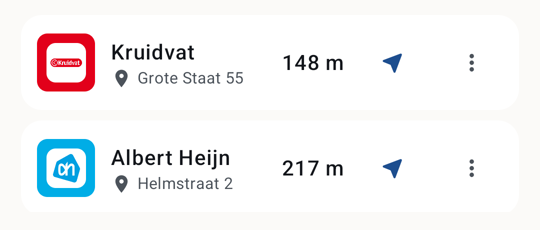
once you are standing in front of one. Every row in the shop list now carries a button that
opens the shop in the map app already on your phone, and a menu for corrections when a shop
has moved or closed. Stapel does not pick the map app for you: it hands over the
coordinates and your phone decides who gets them. With no map app installed, the button is
not there.
12
1The arrow opens this shop in the map app already on your phone. Stapel does not pick that app for you: it hands over the coordinates and your phone decides who gets them. With no map app installed, the button is not there.
2The menu is for corrections, when a shop has moved or closed.
Two rows from the shop list. This is how it looks now, captured on 0.9.11.
One banner instead of separate notices
Standing near several shops you hold no card for used to mean a separate notice for each
one. Now there is one banner saying how many cards Stapel knows for shops right where you
are, which opens when you tap it. The shop name was sometimes clipped behind the buttons
beside it in those rows, and that is fixed.
More logos and more cards
382 logos join, taking the app from 238 to 620, so a chain without one is a good deal rarer.
Where each logo comes from, and on what terms it ships, is under Licences in the app. The
brand catalogue goes from 910 to 927 rows, thirteen of them Canadian cards: Aeroplan, SAQ
Inspire, Journie Rewards, RONA VIPpro and Guardian / I.D.A. Rewards among them. The barcode
format of those Canadian cards is an assumption rather than a measurement, so if one is
wrong it can be reported and it will be put right.
This text is in your own language
Up to and including 0.9.1 the "what’s new" text was written in Dutch and
English only. From this release every version carries a block in every language the store
page speaks, fourteen at the moment, derived from the countries the app supports. The About
screen in the app picks the same block, based on your device language.
0.9.1 Closed test
Testers only · eleven more countries
0.9.0 was about the widget. This one is about the card underneath it: where Stapel knows
shops, which loyalty cards it recognises, and what language it speaks to you in. Austria,
Ireland, Poland, Canada, Australia, New Zealand, Switzerland, Czechia, Slovakia, Mexico and
Argentina join, 250,544 shops between them. That puts the store database at 1,213,080 shops
across 27 countries. Store lists arrive separately from the app, so there is no update to
wait for.
Cards and languages
Six of those countries got their own loyalty cards, led by the coalition cards that cover
the most ground there — one card that works at dozens of chains. Mexico followed:
Spin Premia, which works at OXXO and OXXO GAS, Soriana YA!, Monedero del Ahorro and
Benavides Recompensas. Switzerland is in the store database but carries no card row, and
the reason is written down rather than left unsaid. Stapel also speaks Polish, Czech and
Slovak now: seventeen languages, and no half-translated screens.
What was leaking
A card you had closed could still be visible in the recent-apps overview. Android takes a
screenshot for it at the moment you leave the app — which is exactly the moment
Stapel locks the card again. That is closed now on all three screens that show a code: the
card screen, the share screen and the edit screen. Pinning a shop also wrote your precise
GPS fix into the screen's temporary state; there is no position in there at all any more.
Smaller things
At a larger system font size the wide widget clipped the barcode top and bottom, because it
reserved space for its text in fixed units while the text itself grows. Pressing "Sync now",
walking away and coming back let a second press start a second download of the same country
alongside the first; only one starts now. And on a busy street the widget declines to name
a shop, then used to put that shop first in its chips. It no longer does.
What was not tested here
Whether Android actually withholds the recent-apps thumbnail is the operating system's
answer, not Stapel's. The tests prove Stapel asks, in both of the ways Android has had
since version 8 — not that the leak is closed. The colours of the four Mexican cards
come from each chain's own app icon, and two of those four sites let no visitor in at all,
a normal browser included.
0.9.0 Closed test
Testers only · the widget has become the card
The widget used to show you which card was ready. Now it is that card: the chain's colour,
the shop's mark, and the barcode itself, big enough to be scanned straight off your home
screen. The small widget is no longer a three-by-two block but a single row, edge to edge.
The wide one carries the code of the card that is ready, with three chips under it, each in
its own chain's colour.
Codes that are not made of bars
A QR code, an Aztec code and a Data Matrix are square, and a PDF417 is a block of stacked
rows. Stapel stretched all four into the shape of a barcode, and stretched like that a
scanner does not read them. They keep their own shape now, in all four places Stapel shows
a code. Rossmann, besides, issues no plastic card but a QR code, while Stapel drew an
EAN-13: a symbology this chain has never used, and one that failed at the till rather than
when the card was saved.
The United States, and a country that quietly stopped updating
The American chain list goes from 70 chains to 200: from 134,902 shops to 358,619, and from
26 to 64 per cent of everything carrying a brand name in the map data. Shop lists arrive
separately from the app, so this one does not wait for an update.
A phone accepted at most 200 chains in one shop list, and Japan stood at exactly 200. One
chain more and the phone rejected the whole list, kept what it already had, and reported
the update as a success. Six of the other fifteen countries were within 35 chains of that
limit. The limit is now 5,000.
What was not tested here
The widgets were made and looked at on an emulator, not on a real device. What happens to a
widget already sitting on your home screen when this update arrives was therefore not
measured: a newly placed small widget is one row high, but whether an existing one shrinks
to match is up to your launcher.
0.8.0 Closed test
Testers only · the shop list now downloads only what is nearby
Until now your phone downloaded a country's entire shop list. All of France, all of Great
Britain, everything. That is a lot of data for shops you will never walk past, and it got
worse with every country added. From this version Stapel downloads only the shops within 25
kilometres of you, plus a nationwide baseline holding every chain once.
Including the side that is worse
One case loses: travel a few hundred kilometres without updating in between and you hold
only the nationwide baseline there. So Stapel now says so. When you are somewhere your shop
data is not for, the screen says it, with a button to fetch the right shops. Say "not now"
and it stays away until something actually changes.
Many more shops
Great Britain listed 12 chains against nearly 1,600 in the map data, and now lists 190.
Spain went from 69 to 183. The Dutch list bundled inside the app went from 36 to 173, so
ALDI, Action, Zeeman and McDonald's are simply in it now. Belgium went from 62 to 177,
Italy from 75 to 175 and Portugal from 60 to 166. In France about 3,400 forecourt shops
were missing because one category was never read.
Seven countries arrived: Denmark, Sweden, Norway, Finland, Iceland, Brazil and Japan,
taking the count to sixteen. The app also speaks Danish, Finnish, Icelandic, Japanese,
Norwegian and Swedish now, so it is not only the shop list that came along.
The country list was a flat roll-call of everything Stapel knows. The first screen now
carries the country you are in, the countries you already hold shops for and the ones that
border you; the rest sit behind More countries, with a search field that finds a country by
its name in your language, in English and in its own.
Updating has always been wifi-only, but it was never presented as a choice. It is now a
switch in Settings, off by default: leave it off and nothing is refused, the download
simply waits for wifi. One country runs to tens of megabytes, so that is a choice you
should get to make.
It looks like an app now
Stapel had no type and shape system, and it showed. It has one now, and the card screen, the
tiles, the empty screens and the arrival screen have been rebuilt on it. The Winkels list
shows each chain's brand mark instead of the same blue square everywhere. Search now matches
the chain name and the last four digits of the code.
Motion and haptics arrived too, kept as small as possible: a short tick when a scan lands,
when you save something and when you turn a favourite on, and a longer one before you throw
a card away. Turn animations off in Android and Stapel plays none of them.
A card's brand could only be picked while adding it. Editing can now change it or take it
away, and the screen says what that means: with no brand, arrival watches no shops for that
card.
0.7.2 Closed test
Testers only · three things that went wrong quietly
"Sync now" often answered "Update refused, the previous shop list stays". That is word
for word the sentence a file that fails its signature check produces, and nothing was
wrong. The bundled Dutch list has no entity tag to ask with yet, so the phone fetches
the whole file and only then compares versions. When the version matched there was
nothing to install, and that was reported as a refusal. It now says the shop list was
already the newest version. One country that was already current was also hiding every
other country's result.
Pinning a shop that was not saved
Saying yes to letting Stapel remember a shop against your card dismissed the dialog and
cancelled the save at the same moment. Whether the write finished first came down to
timing, and when it did not, nothing was said. The save now hangs off the screen
underneath, which stays.
A barcode that could not be drawn
On the screen that appears when you arrive at a shop, such a card always showed an empty
white box above its digits. The screen could not say the code was undrawable, because
"still rendering" and "will never work" looked the same. It now shows the same
explanation the card screen already gave.
0.7.1 Closed test
Testers only · reclaiming space with updating off
What checking 0.7.0 over turned up. With updating switched off every country switch
locks, and the "Clear out" button was there for the Netherlands only. Anyone who had
downloaded Germany and then switched updating off kept nearly sixty thousand shops on
the phone with no way left to remove them. The button is now there for the Netherlands,
and for any other country that has shops on the phone while updating is off.
A sentence that no longer fitted
That button asks for confirmation first. The text for countries other than the
Netherlands had existed all along, and up to 0.6.0 you saw it: the button was there for
every country then. In 0.7.0 it went away everywhere but the Netherlands. Now it is
back, but only with updating off, and it no longer fitted that case: it said the shops
come back the next time Stapel updates over wifi, and with updating off that next time
never comes. The text has been rewritten in all eight languages.
Losing a country by walking away
Clearing out wiped the shops first and only then recorded that the country was gone.
Leaving the screen mid-wipe did the first and not the second. The country was empty
while Stapel believed it was up to date, and never recovered. The two steps are now the
other way round, so the next update puts it right.
0.7.0 Closed test
Testers only · a logo for every brand
This version is mostly about the two lists the app fetches from outside: which brands
Stapel knows, and where their shops are. In 0.6.0 those lists updated themselves for the
first time, and that immediately showed what was in them. 44 of the 230 brands had no
logo, only a coloured letter. In the shop list a filling station appeared twice, while
the shop at that same station was missing altogether. Alongside that, you can now choose
how far the shop list looks, and a phone that reads in miles gets miles.
12
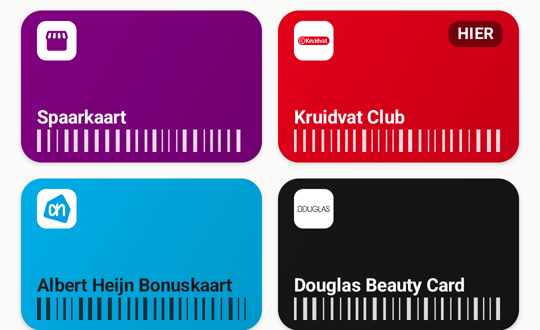
1A card with no chain keeps a generic icon and the colour you chose yourself.
2Every chain Stapel knows now carries its own logo. You recognise the card by how it looks, not by reading the name.
The wallet with six cards. This is how it looks now, captured on 0.9.11.
Every brand now has a logo
230 brands, 44 without a logo. Now 231 brands and not one without. Every file that
ships is listed with its licence in catalogue/logos/ATTRIBUTION.md; what is
not in there does not ship.
The order a logo is looked for in is fixed: Wikimedia Commons first, where the
licence sits with the file, then the chain's own site, and only after that something
supplied by hand, and then only when it says why it is free of rights.
One row was removed. AKO no longer exists as a chain, so offering a card for a
programme that works nowhere is not a service.
Biocoop carried a fortieth-anniversary badge. The badge dates; the mark under it does
not.
TGJones
WHSmith sold its high street shops in 2025 and they have been called TGJones since.
The stations and airports keep the WHSmith name. That is two brands in Stapel now,
because they are two companies.
Of roughly 470 TGJones shops, 216 are in the shop list. The rest still carry the old
name in the public map data, because someone on the spot has to have seen the sign
change. That list updates itself monthly, so those shops arrive without needing a new
version of the app.
Two faults in the shop list
A filling station was listed twice. In the public map data a filling station is often
two things in almost the same place: the pumps, and the shop. Stapel put two pins on the
map a few metres apart. A shop within 125 metres of the same chain's pumps is now read as
the same place.
And the shop at a filling station was missing altogether. In the map data one place
can be more than one kind at once, separated by a semicolon:
shop=convenience;gas means convenience store and filling station.
Stapel read that as one unknown kind and threw the place away. That hit 3,372 forecourt
shops across 50 chains.
Together the two make the list shorter and more complete at the same time.
TotalEnergies in France went from a little over a third of its stations to nearly
two-thirds. In the United States more than nine thousand duplicate rows disappeared.
How far “nearby” goes is now yours to choose
The shop list always looked ten kilometres. That works in the Netherlands, where ten
kilometres holds dozens of shops. It does not work in a country where you drive
everywhere. A tester in the United States was shown an empty list: in rural Kansas there
is no shop within ten kilometres from a chain you hold a card for, and eleven within
fifty.
Settings now carries “What counts as in range”, at ten, twenty-five or fifty
kilometres. Ten stays the default, so anyone who touches nothing sees no change. It
changes the list only: arrival alerts keep their own range, because how many places your
phone watches at once is what they cost in battery.
Miles where miles belong
Stapel wrote every distance in kilometres, in all eight languages, including on a phone
in the United States or Great Britain. Both countries have been in the app since 0.6.0.
A phone that reads in miles now gets miles, and feet for the last stretch. The comma in
“1,5 km” always followed Dutch, on every phone in every language; now it
follows the phone's own language.
Also in 0.7.0
Giant Food joins the list, with 320 shops on the American east coast.
Thirty-three cards carried a colour that was not the brand's colour. Most of those
came to light once the real logo sat next to them.
Three logos were white on white and so invisible: U, Globus and JBC. They now sit on
the brand colour, where they belong. From now on every build measures which panel a logo
needs.
The shop list no longer goes into your phone's backup. It is tens of megabytes and
the app fetches it again anyway, so it never belonged there.
In settings each country is now one row instead of three.
Kotlin, Compose and the rest of the tooling are up to date, and the last six compiler
warnings are gone. None of that changes the app.
0.6.0 Closed test
Testers only · across the border
Stapel was a Dutch app that happened to work in Belgium too. This version makes it an app
that works in nine countries and speaks eight languages. Half the work was removing
assumptions nobody had written down, because in the Netherlands they were always true: a
postcode had the Dutch shape, a country was one outline so the islands fell outside it,
and a border did not exist, so a phone in Dover could arm on Calais.
Nine countries, eight languages
The Netherlands, Belgium, Germany, France, Spain, Italy, Portugal, Great Britain and
the United States. You switch the shops on per country. A country you do not switch on
costs you nothing: no download, no space, no battery.
The United States is too large for one file. It is published in parts, and your phone
fetches only the parts near you, plus one small part that gives every chain a single shop
so the app works before your phone knows where it is.
Dutch, English, German, French, Italian, Spanish, Portuguese and Brazilian
Portuguese. Every text in every language, error messages and notifications
included.
A voucher's code sits behind your lock
A gift voucher is money: whoever reads the code can spend it. So a voucher is closed
by default and a loyalty card is open by default, and you can change either, per
card.
Closed does not mean hidden. The name, the colour, the balance and the expiry date
stay visible. Only the barcode and the code in digits ask for your fingerprint or
PIN.
Both lists now update themselves
The brand list only ever shipped inside the app, so a chain that renamed its loyalty
programme kept the old name until a new version reached the store. Six Dutch programmes
were renamed in 2025 or 2026. Stapel now fetches that list once a month, signed, over the
same route as the store list: no account, no extra permission, no new server.
If a card of yours still carries the old name, the name comes along. If you named it
yourself, your name stays. The Brands screen says when your list was last updated.
The store list could not update itself. The phone did the right thing and
refused a file that was not newer, but the publishing side never raised the version
number, so every published list sat at version 1. Fixed: the next store list is the first
one your phone actually installs.
Also in 0.6.0
You can hand one card to another phone with a QR code on your screen, or as a file.
That goes phone to phone, with no server involved.
A gift voucher that arrived as a PDF can now be imported without printing or
photographing it first.
Standing in a street where several cards work now gives you one notification instead
of one that kept changing card. Leaving one shop while you are still inside another no
longer clears it.
The app claimed arrival detection cost 1 to 2 per cent a day. That figure had never
been measured. It is gone, in every language.
0.5.0 Closed test
Testers only · fewer questions
Stapel asked too much. In two places where the app asked something it already knew, it
now answers itself: which shop you are standing in when you scan, and which card you
need when you walk in.
Part of what follows is already in 0.4.1, the version testers hold today. That release
was about one thing, the scanner that crashed, and the rest came along without being
announced. So each part below says which version it started working in.
Already in 0.4.1, without a note saying so
First run no longer asks for location, notifications and arrival detection before a
single card is in. Arrival detection is offered when you want it, and it still stays off
until you turn it on.
Four tabs are now three and five filters are now three. “Bonnen”
(vouchers) is a filter in your card list, with the same expiry dates and balances as
before.
Kind and code type are off the card screen. Code type, colour and note sit behind
“Meer details” when adding and editing.
A shop pinned in the wrong place can be moved to where you are standing. That
correction stays on your phone and does not overwrite the original shop.
New in 0.5.0
Scan a card while standing in the shop and Stapel fills in the brand for you to
confirm in one tap. Only where the chain’s card is a QR code, and no other known
shop is nearby, does it save the card outright. A barcode off the shelf never does: in a
supermarket that looks too much like a loyalty card. The app never asks for your location
during a scan.
Arrival notifications can put the barcode on your lock screen, at full brightness,
with no unlocking. That stays off until you turn it on yourself.
Three places spelled out in words whether something was on or off, next to a chevron,
a switch or a button that already said so. Those words are gone. Screen readers still
hear the state.
What the last pass on a phone turned up
A voucher with no expiry date showed a calendar icon next to “no expiry
date”, and “unlimited” next to that. It now shows only
“unlimited”. With a date, the calendar stays.
Asking for a voucher and then typing the code in by hand saved a loyalty card. A
voucher now stays a voucher.
“Meer details” sprang open on the manual add screen as soon as you
started typing. It now stays closed until you open it.
The prompt asking whether Stapel may have the card ready always said “you now
have two cards”, including over a wallet of nine after restoring a backup. It now
names the real number.
Dichtbij with no known location explained itself and then showed the generic
“nothing found” block underneath. That second block is gone.
And what the pre-release check turned up after that
The scanner was allowed to save a card outright as soon as one known chain was around
you and the code matched that brand’s established barcode type. For the country’s
largest supermarket chain that type is a plain barcode, which every product on the shelf
carries too. A packet of chocolate sprinkles could land in your stack as a loyalty card.
Stapel now always asks for that kind of code.
The dialog asking whether to add a card you already hold added it when you tapped
outside or pressed back. Those two now add nothing.
A second arrival left the first shop’s card on the lock screen. It now
changes.
On a light card colour the name was drawn in white, on the card screen and on the
lock screen. The ink now follows the card.
Screen readers still announced the old name for “Meer details”. And the
privacy page said seven permissions while the Android screen shows ten. The page now names
both counts and where the other three come from.
0.4.1 Closed test
Testers only · scanning actually works now
The 0.4.0 release note contains the sentence “Scannen werkt gewoon”
(“scanning just works”). It did not. In the build testers received, the app
closed itself the moment you opened “Kaart scannen”. Not on one phone, not
for one kind of card: always, for everyone. That sentence stays where it is; this
release is the correction.
What went wrong
Before the app goes to Play it is made smaller: anything that appears to be unused is
stripped out. Google’s scanner library, however, is not called the ordinary way,
it looks itself up by name. The stripping tool could not see that and removed part of
it. This was not only in 0.4.0, it was in every build that ever went to Play. It was
never reported because nobody ever opened those builds.
What was done about it
The scanner is left alone during stripping, and a check in the build now fails if
this part is ever removed again.
The app could also close when opened through the “Scannen” shortcut or
through a notification. That depended on timing, so it did not happen every time, and it
also affected the notification you get when you walk into a shop.
Update to 0.4.1 and scanning works. Cards you entered by hand are still there.
0.4.0 Closed test
Testers only · the first build testers actually receive
Earlier versions were in Play, but nobody ever saw them. This is the first release that
actually reaches testers, so it was gone over more thoroughly than all the previous ones
together. More was taken out than added.
What was removed
Google’s scanner library sent details about your device to a Google server of its
own accord the moment you opened the camera: make and model, your carrier, country,
language and time zone. That was not something I did, but it happened inside my app,
while the privacy page claimed there were no analytics in it. The official way to turn
it off turns out not to work for this variant, so the component that performs the upload
was removed. Measured: nothing is queued after that. Scanning still works, and a build
check keeps it out.
What is new
A reminder thirty days before a voucher expires or a paid membership renews, so
cancelling stays possible. It is on; you can turn it off.
A shop you pinned yourself can now be removed or pinned again.
A shop that no longer exists can be reported, and that report can be undone if you
were wrong. Both sit together under “Jouw correcties”.
What was broken
The small widget never showed a card. It only showed one on arrival at a shop, and
arrival detection is off by default, so in practice it stayed empty.
Two icons were not drawn at all: the folder in Settings and the handle for dragging
cards. On a real device they were blank spots.
Restoring a backup could need more memory than a cheap phone has. The file is now
read a piece at a time.
What this website got wrong
The backup was called “encrypted” on four pages. It is not and never was:
it is plain JSON, deliberately, so you can still open it in ten years. The backup screen
in the app said so plainly all along.
The features page said no brand logos ship in the app. There are 119, they are on,
and they come from Wikimedia Commons under free licences.
The privacy page listed photos of your card as stored data. That feature does not
exist.
0.3.0 Closed test
Testers only · not yet public
Stapel only knew Dutch shops. If you filled up in Belgium or did your shopping in
Germany, the shop list was no use to you. It now knows six more countries, and you choose
which ones to download.
What is new
Shops in Belgium, Germany, France, Spain, Italy and Portugal. Over 164,000 of them,
alongside the 9,152 Dutch ones already in the app.
130 foreign loyalty programmes, from Colruyt Xtra and PAYBACK to Cartão
Continente. Where one card works at several chains, Stapel knows it: the Xtra card covers
Colruyt, OKay, Bio-Planet, Spar, Dreamland and DATS 24.
You choose per country whether you want those shops. Only the Netherlands is on; you
download the rest yourself, over wifi only.
Come within twenty kilometres of a country you have not chosen and Stapel can offer
to fetch it. This is off, and only turns on if you turn it on.
A country you no longer need, you remove again. It tells you what that frees up.
150 of the 179 chains now carry their own logo on the card instead of the symbol for the
kind of shop. They sit inside the app, so nothing is fetched to show them. Settings lists,
per logo, where it came from and under which licence.
What you will not notice, and should not
The app stays Dutch. This is for Dutch people travelling or living abroad, not a
translated app for other countries.
Stapel still asks for no account anywhere, and still sends nothing about you.
Downloading a country is fetching an ordinary file, with nothing about you attached.
The border check happens on your phone and only while the app is open. No background
location, no new permissions.
0.2.0 Closed test
Testers only · not public yet
Until now a card could only get in through the camera, and once in, nothing about it
could change. Both of those are over.
What is new
Type a card in by hand. For the card too worn to scan, the code printed too small, or
the number you wrote down somewhere. Type a chain Stapel knows and the colour, logo and
barcode type arrive with it.
Edit a card. The pencil opens name, kind, code, barcode type, colour, note and the
fields belonging to a voucher or a membership.
A code its format cannot draw will not save. Stapel says what is wrong:
“EAN-13 needs 13 digits, you typed 11.” A card that shows nothing fails at the
till with the queue behind you.
What was fixed
Tapping an arrival notification closed the app instead of opening the card.
0.1.1 Closed test
Testers only · not public yet
One version after the first, and straight onto the feature the app is built around.
What was fixed
Tapping an arrival notification closed the app instead of opening the card. The code
that reacts to such a notification started navigating before the screen it navigates to
existed. That was fine until the onboarding wizard arrived: since then that screen first
waits on a setting that has to come off disk, and in that fraction of a second every cold
start from a notification died.
What did not change
Nothing else. No new features, no new permissions, nothing about your cards.
0.1.0 Closed test
Testers only · superseded by 0.1.1
The first line of the log exists, deliberately, before there is anything to release.
What is built
On-device card storage: loyalty cards, gift vouchers and memberships, with folders
and manual ordering. Cards can be dragged to another position or another folder.
On-device barcode rendering, with check-digit validation. An EAN-13 with a wrong
check digit is rejected rather than drawn incorrectly, both when drawing and when
importing.
The card list and the card screen, with a landscape view for the checkout.
Camera scanning, with chain recognition.
Importing from Catima and from Apple Wallet, and a backup of its own that you write
out and restore yourself.
Arrival detection with notifications when you are at a shop, and shops you can
pin.
Two widgets, a Quick Settings tile and launcher shortcuts.
The store database: 9,153 stores across 36 chains from OpenStreetMap, checked
against published counts, signed, and reproducible byte for byte. Per-chain figures are
on the store data page.
The monthly sync of that store list.
The brand catalogue: 49 Dutch chains researched, 39 with a loyalty or membership
programme, 43 with a logo.
What is not built
Screenshots of the widgets. The app's own screens are real; only the widget
illustrations on the features page are still sketches, and
it says so there.
Nobody but the author has used the app yet.
What I already know is wrong
For 488 stores I have no street name and for 558 no postcode. Arrival detection is
unaffected, because it works on coordinates. A postcode search is not.
DA and Pets Place are the weakest chains in the database: I find 71% and 75% of
what the published figures say should be there. Etos sits at 94%, about 29 stores
short.
Albert Heijn comes out at 118%. OpenStreetMap counts branches that the Locatus list
holds as a single point. Too many stores is less bad here than too few, but it is not a
clean number.
Of the 49 chains in the catalogue, the preferred barcode format is verified for 6.
For the other 43 it is an assumption or a guess. It therefore counts only as a hint for
hand-typed numbers; what the scanner reports always wins.
In the Play Store
Stapel is in the Play Store. Free, with no account, and you do not need to be on
any list.